> ## Documentation Index
> Fetch the complete documentation index at: https://resend.com/docs/llms.txt
> Use this file to discover all available pages before exploring further.
# Send emails with Laravel
> Learn how to send your first email using Laravel.
export const YouTube = ({id}) => {
return ;
};
## Prerequisites
Before you start, you'll need:
* A Resend [API key](/create-an-api-key)
* A [verified domain](/add-a-domain)
Prefer watching a video? Check out this video walkthrough below.
## Guide
First, install Resend for Laravel using the Composer package manager:
```bash Composer theme={"theme":{"light":"github-light","dark":"vesper"}}
composer require resend/resend-laravel
```
### API key
Next, configure your Resend API key in your application's `.env` file:
```ini .env theme={"theme":{"light":"github-light","dark":"vesper"}}
RESEND_API_KEY=re_xxxxxxxxx
```
If you've upgraded your Laravel project from an older version (pre-5.5) and haven't enabled auto service provider discovery, you'll need to manually register the Resend service provider. Add the provider to the `providers` array in your `config/app.php` file:
```php config/app.php theme={"theme":{"light":"github-light","dark":"vesper"}}
'providers' => [
// ... other providers
Resend\Laravel\ResendServiceProvider::class,
],
```
Without this registration, the Facade may reference the core Resend PHP client instead of the Resend Laravel library, causing unexpected behavior.
### Mail driver
To use Resend as your mail driver, first create a new mailer definition, in the `mailers` array within your application's `config/mail.php` configuration file:
```php mail.php theme={"theme":{"light":"github-light","dark":"vesper"}}
'resend' => [
'transport' => 'resend',
],
```
Next, update your application's `.env` file to use the Resend mail driver:
```ini .env theme={"theme":{"light":"github-light","dark":"vesper"}}
MAIL_MAILER=resend
MAIL_FROM_ADDRESS=onboarding@resend.dev
MAIL_FROM_NAME=Acme
```
Resend for Laravel provides two convenient ways to send emails, using Laravel's email service or the `Resend` API facade.
### Using the Mail Facade
```php OrderShipmentController.php theme={"theme":{"light":"github-light","dark":"vesper"}}
order_id);
// Ship the order...
Mail::to($request->user())->send(new OrderShipped($order));
return redirect('/orders');
}
}
```
### Using the Resend Facade
```php OrderShipmentController.php theme={"theme":{"light":"github-light","dark":"vesper"}}
order_id);
// Ship the order...
Resend::emails()->send([
'from' => 'Acme ',
'to' => [$request->user()->email],
'subject' => 'hello world',
'html' => (new OrderShipped($order))->render(),
])
return redirect('/orders');
}
}
```
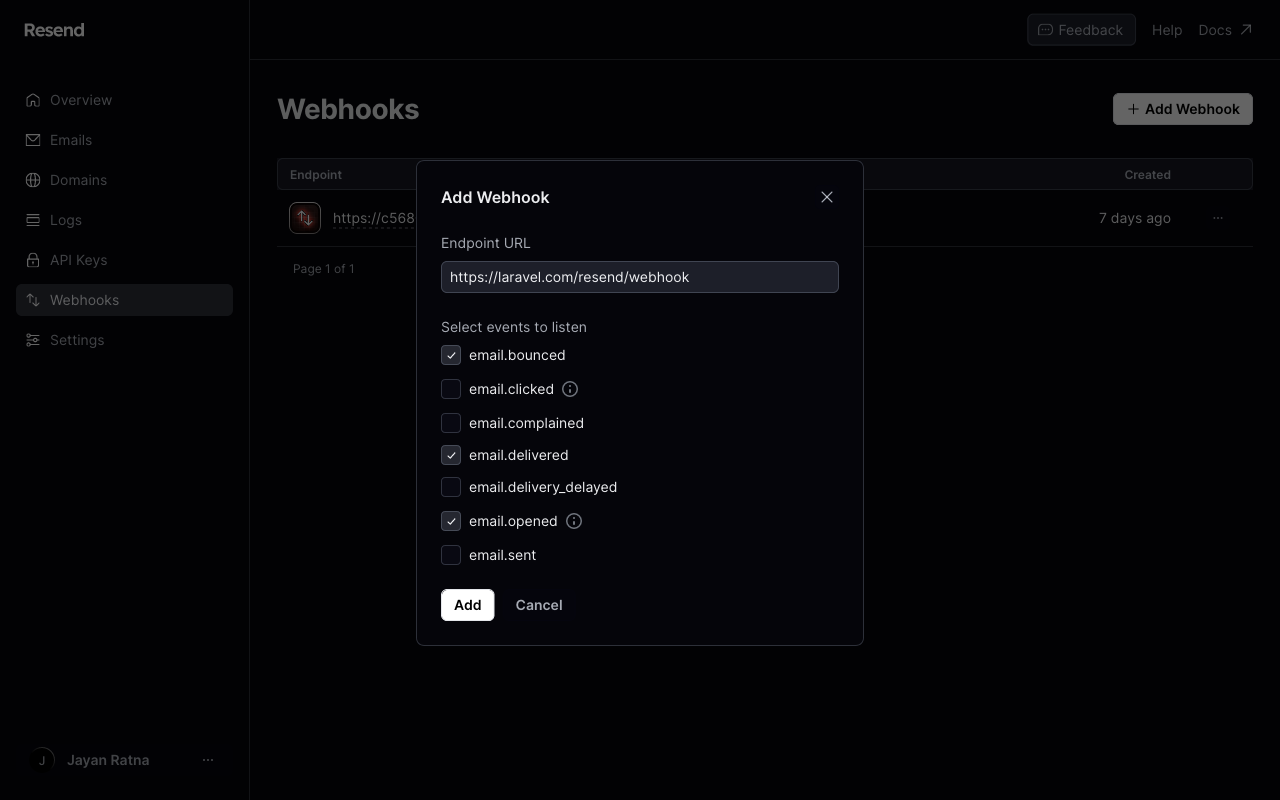
By default, Resend for Laravel includes a webhook controller to respond to the `/resend/webhook` URL path. The controller will dispatch a Laravel event that corresponds to a Resend event. For example, an `email.delivered` event type will send an `EmailDelivered` Laravel event.
### Register the webhook endpoint
Register your publicly accessible HTTPS URL in the Resend dashboard.
For development, you can create a tunnel to your localhost server using a tool like
[ngrok](https://ngrok.com/download) or [VS Code Port Forwarding](https://code.visualstudio.com/docs/debugtest/port-forwarding). These tools serve your local dev environment at a public URL you can use to test your local webhook endpoint.
Example: `https://example123.ngrok.io/api/webhook`
### CSRF protection
Webhook requests from Resend need to bypass Laravel's CSRF protection. Be sure to list the URI as an exception in your application's `App\Http\Middleware\VerifyCsrfToken` middleware or list the route outside of the web middleware group:
```php theme={"theme":{"light":"github-light","dark":"vesper"}}
protected $except = [
'resend/*',
];
```
### Verifying webhook signatures
To enable webhook verification, ensure that the `RESEND_WEBHOOK_SECRET` environment variable is set in your application's `.env` file. The **Signing secret** can be retrieved from your [Resend dashboard](https://resend.com/webhooks).
## Examples
Basic, scheduled, attachments, CID, templates, and prevent threading
Handle webhook events
Receive and process inbound emails
Double opt-in subscription flow
Manage contacts and audiences
Create and manage sending domains
 ### CSRF protection
Webhook requests from Resend need to bypass Laravel's CSRF protection. Be sure to list the URI as an exception in your application's `App\Http\Middleware\VerifyCsrfToken` middleware or list the route outside of the web middleware group:
```php theme={"theme":{"light":"github-light","dark":"vesper"}}
protected $except = [
'resend/*',
];
```
### Verifying webhook signatures
To enable webhook verification, ensure that the `RESEND_WEBHOOK_SECRET` environment variable is set in your application's `.env` file. The **Signing secret** can be retrieved from your [Resend dashboard](https://resend.com/webhooks).
### CSRF protection
Webhook requests from Resend need to bypass Laravel's CSRF protection. Be sure to list the URI as an exception in your application's `App\Http\Middleware\VerifyCsrfToken` middleware or list the route outside of the web middleware group:
```php theme={"theme":{"light":"github-light","dark":"vesper"}}
protected $except = [
'resend/*',
];
```
### Verifying webhook signatures
To enable webhook verification, ensure that the `RESEND_WEBHOOK_SECRET` environment variable is set in your application's `.env` file. The **Signing secret** can be retrieved from your [Resend dashboard](https://resend.com/webhooks).